
Case Study: How My DU Telecom 1 Gbps Internet Finally Started Feeling Like 1 Gbps.
I upgraded to Du Telecoms 1 Gbps internet and still had slow Wi-Fi in my hallway and home office. Here’s the real-world story of how I redesigned my home mesh network and finally made it work.

A story about a Dubai apartment, a few Linksys boxes, and why most people misunderstand Wi-Fi.
For a long time, I had this quiet frustration that I didn’t really talk about.
On paper, my home internet was excellent.
I was on a 600 Mbps DU Telecom Home basic plan. I had what i believed was a modern linksys mesh Wi-Fi system. I lived in a premium Dubai apartment. Everything should have been smooth.
And yet, every evening, the same things kept happening when two heavy internet users are on the network.
Netflix would pause in the bedroom.
Zoom calls would freeze in my home office.
Online games would suddenly lag for no obvious reason.
The Wi-Fi bars were always full.
The experience never was.
Key Takeaways
- A 1-Gbps ISP connection does not guarantee 1-Gbps Wi-Fi in every room
- “5G Wi-Fi” and mobile 5G are completely different things
- In Dubai apartments, thick walls and concrete mean Wi-Fi needs proper design
- Mesh Wi-Fi only works well when the routers are connected properly
- Old or weak nodes can slow down new, powerful routers
- One Ethernet cable between key routers (wired backhaul) can outperform any expensive upgrade
- Wi-Fi 6 is already powerful enough for most 1-Gbps homes
- Wi-Fi 7 only matters if you have multi-gigabit internet or extreme performance needs
- Your device’s Wi-Fi card can be the real speed limit
- Most “slow Wi-Fi” problems are layout and design problems, not ISP problems
Why This Became a Project Now
For context, I come from a tech background. I have dealt with complex systems for a living. I know how deep networking problems can go.
But like most people, I’m also human.
When something sort of works, you live with it. You tolerate it. You tell yourself you’ll look into it “one day.”
And between work, travel, and building a startup, that day never really came.
What changed was timing.
My du telecom contract came up for renewal just before Christmas, and I upgraded to their 1-Gbps home basic plan. At the same time, I decided to work from home through the Christmas and New Year holidays instead of travelling. ( Thanks to the Dubai weather for that Europe Christmas like feeling !)
But it wasn’t just me.
The misses is also a full-time core team member in my startup in a WFH setup.
She’s constantly on project remote calls, using cloud platforms, streaming content, and yes she’s a serious streamer too.
So suddenly, it wasn’t just my traffic on the network it was two heavy users running in parallel, all day, every day.
Suddenly, the weak spots in my Wi-Fi weren’t occasional annoyances, they were impossible to ignore.
That’s when I finally decided:
“Okay, let’s stop living with this and actually fix it.”
What I Was Actually Working With
Back then, my Wi-Fi setup looked sensible.
DU Telecom Home Basic Plan - 600 Mbps
In the living room I had a Linksys MX5500.
Down the hallway I had two Linksys WHW03 v2 mesh units trying to extend the signal.
On all my devices I saw two Wi-Fi names (SSIDs):
wifi-namewifi-name-5g
Every room had signal.
Nothing disconnected.
And yet:
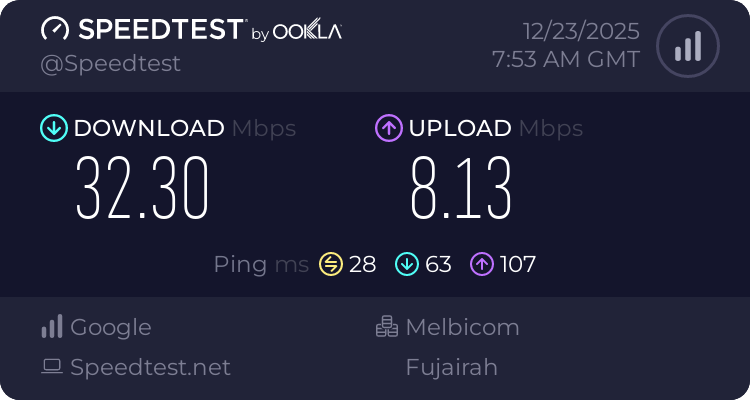
- Living room → fast
- Hallway → 30–100 Mbps
- Bedroom and home office → buffering, Zoom drops, gaming lag
It was the worst kind of problem:
everything looked fine, but nothing felt right.
The DU Telecom Upgrade That Exposed Everything
When du telecom installed the new Linksys SPNMX56 and upgraded me to 800–1000 Mbps, I was excited.
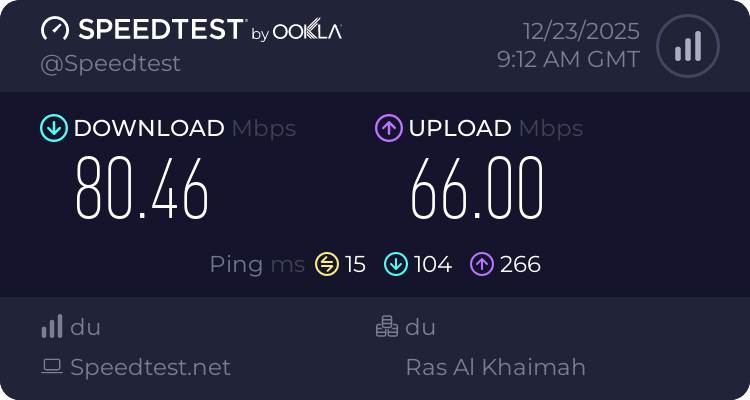
Standing next to it, my iphone showed 900+ Mbps.
It was beautiful.
Then I walked to the hallway.
The number dropped.
I walked to the home office.
It dropped again.
That was the moment I finally understood:
du telecom was giving me incredible internet.
My apartment wasn’t receiving it properly.
The “5G” Confusion I See Everywhere
This is where my building WhatsApp group comes in.
Almost every week, someone writes:
“My Wi-Fi is terrible. I’m on 5G.”
And nobody ever asks:
“What kind of 5G?”
Because there are two completely different things people mean.
Mobile 5G = SIM-based internet.
5-GHz Wi-Fi = a fast wireless band inside your home.
My two networks:
wifi-name→ 2.4 GHz (longer range, slower)wifi-name-5g→ 5 GHz (shorter range, much faster)
Both come from the same Main Router via the du telecom fiber line.
Once you understand that, you stop blaming the internet and start looking at the Wi-Fi.
Why Dubai Homes Make This Hard
Dubai apartments are beautifully built:
- Concrete
- Steel
- Tiles
- Thick walls
- Elevator shafts
That’s great for comfort and durability, but radio waves don’t love those materials.
So Wi-Fi here needs help.
That help is mesh but only if the mesh is designed properly.
Mine wasn’t.
And Yes, We Are Heavy Users
We’re just two people, but our apartment behaves like a small digital studio.
We run:
- Zoom calls
- Real-time SaaS platforms
- Cloud tools for our startup
At night:
- Heavy online gaming
- Netflix, Disney+, Apple TV, OSN+
- YouTube and social media
Between phones, laptops, TVs, speakers, and smart devices, we have around 20+ active connections.
Weak Wi-Fi shows up instantly in a setup like this.
The First Real Change
When du telecom gave me the Linksys SPNMX56, it became my new main router.
My old Linksys MX5500 which was the main router moved into the middle of the apartment.
I removed one of the old hallway units.
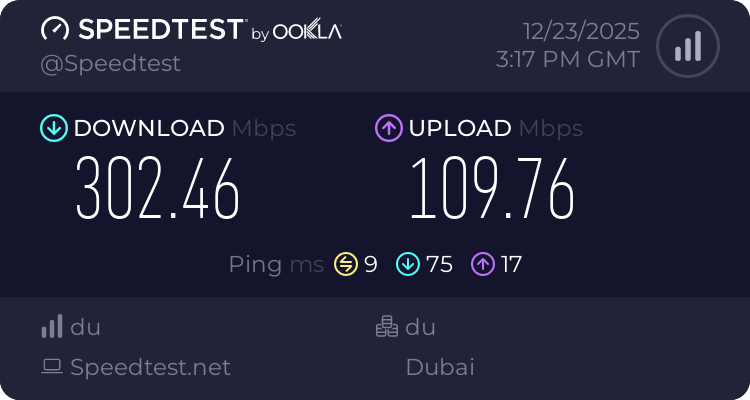
Even that alone pushed hallway speeds from ~80 Mbps to ~300 Mbps.
That was my first “aha” moment:
Old mesh nodes quietly drag everything down.
The One Cable That Made It All Click
Then I did something simple.
I ran a single Ugreen 50m Ethernet Cat 6 cable (Costing 50AED) between:
- The Linksys SPNMX56 in the living room
- The Linksys MX5500 in the middle of the apartment
Now those two stopped talking over Wi-Fi and started talking over wire.
That’s called wired backhaul.
And that’s what unlocked everything.
Why Everything Feels Different Now
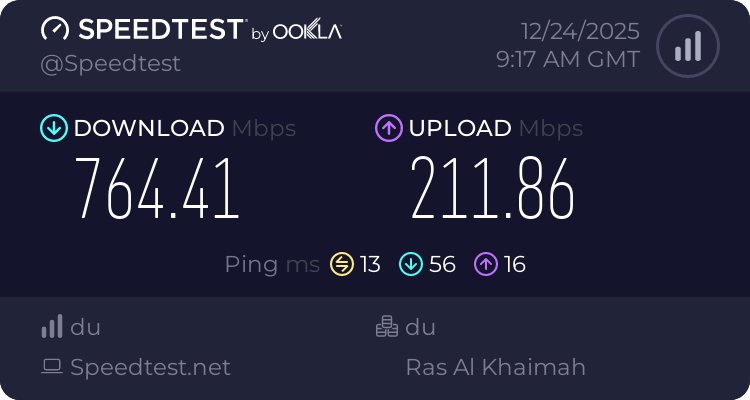
Today, the signal path looks like this:
du → main router → Ethernet → middle router → short 5-GHz Wi-Fi → hallway unit → my devices
Only one small wireless jump remains.
Zoom stopped freezing.
Games stopped lagging.
Streaming stopped buffering.
Not because of a new router.
Because of one cable.
How Wi-Fi Routers Talk to Each Other
In a mesh Wi-Fi system, your routers don’t just talk to your iphone/laptop, they also have to talk to each other.
That conversation is called the backhaul.
There are two ways this can happen:
- Wireless Backhaul (What I Had Before)
This means the routers talk to each other over Wi-Fi.
Depending on the model and distance, they use:
- 2.4 GHz (slower but longer range)
- 5 GHz (faster but shorter range)
In my older setup, some of the hallway units were likely using 2.4 GHz for backhaul because of model limitations, distance and walls which severely limited speed.
After the upgrade, the newer routers could use 5 GHz, which helped, but it was still wireless and still lost speed.
Every wall, reflection, and neighbour’s Wi-Fi reduces what actually gets through.
- Wired Backhaul (What Fixed Everything)
When I connected the SPNMX56 to the MX5500 using a Cat 6 Ethernet cable, the two main routers stopped using Wi-Fi to talk to each other.
They switched to a dedicated 1-Gbps wired link instead.
That means:
- No interference
- No signal loss
- No fighting with phones, TVs, or neighbours for airtime
All the wireless bandwidth was now free to serve my devices, not the routers themselves.
That is why one cable made such a massive difference.
Do You Really Need Wi-Fi 7?
Wi-Fi 7 is the newest generation of wireless networking. It is faster, smarter, and designed for the future but that doesn’t mean everyone needs it today.
Here’s the simple truth.
If you are on a 1-Gbps or even a 2-Gbps internet plan, a properly designed Wi-Fi 6 network is already more than powerful enough to deliver everything your home can realistically use. Streaming, Zoom, gaming, cloud apps, smart homes, Wi-Fi 6 handles all of it comfortably.
Wi-Fi 7 only starts to make real technical sense when:
- You move to multi-gigabit internet (2.5 Gbps, 5 Gbps, or higher)
- You have many heavy users in the same home
- You run ultra-low-latency applications like VR, cloud gaming, or large real-time data transfers
In other words, Wi-Fi 7 is built for the next wave of internet speeds, not today’s typical fiber plans.
That said, if Wi-Fi 7 routers are priced similar to Wi-Fi 6, choosing Wi-Fi 7 can be a smart form of future-proofing. You won’t see dramatic speed differences today on a 1-Gbps plan, but you’ll be ready when your internet package eventually moves beyond it.
For most homes right now:
Fixing Wi-Fi design beats upgrading Wi-Fi standards.
A well-designed Wi-Fi 6 network will outperform a badly designed Wi-Fi 7 network every time.
The Linksys Models in My Home (Quick Comparison)
| Model | What It Is | Wi-Fi Version | Bands | What It’s Good For |
|---|---|---|---|---|
| SPNMX56 | My new main router from du | Wi-Fi 6 (AX) | 2.4 GHz + 5 GHz | Fastest and most powerful unit — perfect as the main router |
| MX5500 | My older high-end mesh unit | Wi-Fi 6 (AX) | 2.4 GHz + 5 GHz | Still very strong — ideal as a wired middle (Relay) node |
| WHW03 v2 | Older Velop mesh node | Wi-Fi 5 (AC) | 2.4 GHz + 5 GHz | Good for coverage, but slower — best used only at the far end |
| Old MX series (pre-AX) | Older generation mesh | Wi-Fi 5 | 2.4 GHz + 5 GHz | Can reduce performance if used too close to main router |
What this means in simple terms
- Wi-Fi 6 (AX) = newer, faster, handles many devices better
- Wi-Fi 5 (AC) = older, still works, but slower under load
When you mix them:
- Use Wi-Fi 6 units close to your main router
- Push older Wi-Fi 5 units to the far end of the home
This is exactly why removing one old WHW03 and wiring the MX5500 made such a big difference in my setup.
One Last Reality Check
Your phone may be faster than your laptop, that’s normal.
Modern phones and Macs have better Wi-Fi radios than many laptops.
The slowest device sets the speed.
What I Learned
Most people don’t actually have bad internet unless they’re on a low-speed plan, using a mobile 5G router in a weak signal area, or pushing a small setup far beyond its limits with many devices.
What most people really have is badly designed Wi-Fi.
And in a Dubai apartment, where walls and interference are part of daily life, one Ethernet cable placed correctly between the right routers can do more than any expensive new router ever will.
Home Wi-Fi Reality Check. A Simple Checklist
If your Wi-Fi feels slow, walk through this in order:
- Check what “5G” really means
Ask yourself:
- Am I on mobile 5G (SIM router)?
- Or 5-GHz Wi-Fi (
-5gnetwork name)?
They are not the same thing.
- Stand next to your main router
Run a speed test right next to it.
- If it’s fast → du telecom is doing its job
- If it’s slow → call du telecom tech support
- Walk to the problem room
Run the same test in:
- Hallway
- Bedroom
- Home office
If the speed drops a lot → it’s a Wi-Fi design problem, not an ISP problem.
- Count your Wi-Fi boxes
More is not always better.
Too many old mesh nodes = more slowdown.
Sometimes removing one makes everything faster.
- Look at how your routers talk to each other
If your mesh routers connect over Wi-Fi, you are losing speed.
If you can, connect:
Main router → second router → Ethernet CAT6 cable
This single step fixes most problems.
- Test with a modern phone
Use a recent iPhone, iPad, or Mac.
If it’s fast there but slow on a laptop → the laptop’s Wi-Fi card is the limit.
- Think about how you actually use the internet
Do you have:
- Zoom calls?
- Online gaming?
- Netflix / YouTube / Apple TV?
- Cloud apps?
Then your home network is under constant heavy load.
It needs to be designed properly, not just “good enough.”
- Don’t rush to Wi-Fi 7
Fix:
- Placement
- Old nodes
- Wired backhaul
First.
Wi-Fi 6 is already more than enough for 1-Gbps homes when done right.
Frequently Asked Questions
Is 5G Wi-Fi the same as mobile 5G?
No. 5G Wi-Fi means your device is connected to the 5-GHz Wi-Fi band inside your home. Mobile 5G is a SIM-based internet connection provided by telecom operators. They are completely different technologies that just happen to use the same name.
Why is my internet fast in one room but slow in another?
Because Wi-Fi weakens as it passes through walls, floors, and furniture. In apartments built with concrete, steel, and tiles (like most Dubai homes), this effect is stronger. That’s why router placement and mesh design matter more than just buying a faster internet plan.
I upgraded to 1-Gbps internet. Why didn’t my Wi-Fi get faster everywhere?
Your internet speed only reaches your main router. After that, Wi-Fi takes over. If your mesh nodes are talking to each other over weak wireless links, your devices won’t see the full speed. This is why wired backhaul makes such a big difference.
What is wired backhaul in simple terms?
It means connecting your main router to your other Wi-Fi nodes using Physical Ethernet CAT6 cables instead of Wi-Fi. This lets your mesh system move data at full speed with no wireless loss between the routers.
Do I need Wi-Fi 7 for a 1-Gbps connection?
No. A properly designed Wi-Fi 6 network is already more than powerful enough for a 1-Gbps internet plan. Wi-Fi 7 mainly helps if you have multi-gigabit internet, lots of users, or need extremely low latency.
Why is my phone faster than my laptop on the same Wi-Fi?
Modern phones, iPads, and Macs often have better Wi-Fi radios than many laptops and desktops. If your phone shows higher speeds, that usually means the laptop’s Wi-Fi card is the limiting factor, not your network.
How many devices can a small household really have?
Even two people can easily have 15–20 connected devices when you include phones, laptops, TVs, speakers, consoles, and smart-home gadgets. Add Zoom calls, gaming, and streaming, and your Wi-Fi is under constant heavy load.
What’s the biggest mistake people make with home Wi-Fi?
They keep adding more mesh nodes instead of fixing how the routers connect to each other. Too many weak nodes can actually slow the entire network. Fewer, better-placed units with wired backhaul almost always perform better.
Disclaimer
This article is not a paid review, promotion, or sponsorship of any internet service provider or hardware brand.
My du fiber connection delivered exactly what was promised. I consistently received near-gigabit speeds at the main router after upgrading my plan. The issues I experienced were not due to du’s network, but due to how my home Wi-Fi and mesh extension were originally designed and placed.
This write-up simply documents my real-world experience of redesigning my own home network so that the speed du delivered at the router could actually reach every room in my apartment.
I share it so others facing similar Wi-Fi problems, especially in concrete-built apartments can understand what’s really happening and how to fix it.